
Translate this page

Showing posts with label Facebook. Show all posts

Monday, July 30, 2012

How to get the email ids of all facebook friends.


0 comments


If your facebook friend doesn’t want to share his/her email id then you can’t get their email ids. But I have a trick to get the email ids of all the facebook friends. You have to follow some steps…


1.       Open your yahoomail account. If you don’t have yahoomail account then create it.
2.       Go to Contacts Tab.
3.       Click on import contacts as shown in image below.
4.       Click on facebook symbol.
5.       Now it will ask the username and password of facebook account. Enter the username and password.
6.       In next step it will ask for the confirmation press okay.
7.       Now it will show how many email ids has been imported.
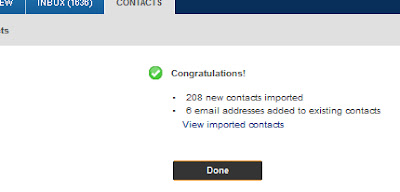
8.       Click on view imported contacts link. It will show all the contacts in your list.
9.       Now click on action button and then Export All.
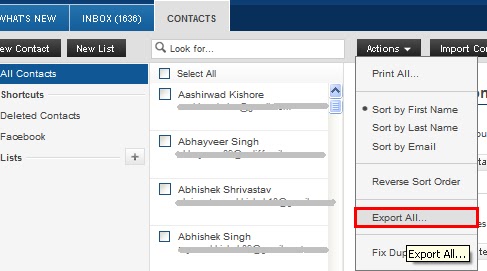
10.   Press Export Now.
11.   It will ask for a captcha code fill it and enter and it will download a file.
12.   Open this file in MS Excel.
13.   Find Email column. You will get all the email ids in this column of excel sheet.
****Note : sometimes we are not able to get all the email ids in excel sheet. For this you can follow below steps
1.       Follow above 8 steps.
2.       Click on action button and press Print All.
3.       In next step press Display For Printing.
4.       It will show all the email ids with the name of that person you can copy the email id from here.
ENJOY!!!!

 Learn Also....

How to save your computer from the virus injected USB flash drives.

How to hide your Disk Drive.....

Wednesday, April 13, 2011

How to add facebook like button on blogger page.


0 comments


The most popular social plug-in launched by face book is like button, you will find this button at every website. In this post you will learn how to add and customize this button to your blogger blog.

How to add like button:-

Here I am writing the button code here.


<iframe allowTransparency='true' expr:src='"http://www.facebook.com/plugins/like.php?href=" + data:post.url + "&layout=standard&show_faces=false&width=100&action=like&font=arial&colorscheme=light"' frameborder='0' scrolling='no' style='border:none; overflow:hidden; width:450px; height:40px;'/>

Where to add this code in your blog?

Sign in your blogger account. Go into design tab. Open “Edit HTML”

Design>>Edit html

Click on Expand Widget Templates

Find the following code in your html code:-

<div class='post-header-line-1'/>

Now paste your button code after this code line.

If you will not find the above line then find next line

<data:post.body/>

And paste your button code Before this code line.

Click on SAVE TEMPLATE link.

you can see the example in this post.


You can customize it by changing the Arial font into one of the following fonts..

lucida+grande
segoe+ui
tahoma
trebuchet+ms
verdana

If you like this post then share it with your friends.

Tuesday, March 29, 2011

See your facebook friends on Google Map


0 comments


Hi friends, if you are using the facebook then here is a usable application for you. You can see your friends on the Google map. WhereMyFriends is an interesting application of facebook that will show you the geographical location of your friends on a Google Earth Map.

You have to connect your facebook account with this application and within one or two minutes application will fetch the location of your friends and shows them on the Google Map.

If you want to see the information of any friend, just click on that pin and you will get their name.

One disadvantage for this is, you can not keep it private. It is public and you can't change this setting. Every one can also see your friends list and their place or location.

You can see this example.

It is the usable and interesting application for the users of facebook. Share it with your friends.

Friday, March 18, 2011

Covert your files in PDF format using Facebook.


0 comments

Many times we need to convert word document into PDF file. Generaly we convert these files offline. We use many large softwares to do this. But it will be better if we can do this thing on the web network.
Now facebook has a new web application to convert the Microsoft PowerPoint, excel nr word files to PDF files. Many other documents also can be converted using this application. This application is known as PDF creator.
It is free to use. There are few easy steps to complete your task. Go to the PDF Creator webpage.


Click on green button shows in snapshot "CLICK HERE TO START CREATING PDF DOCUMENTS". Browse the document you want to convert as shown in the screenshot below.


The resulted document can be easily downloaded with the link. You will receive an email in your inbox regarding the same. Email alsn contain the link to download the resulted file. You can access the link only for 24 hours.
It is easier or faster steps to convert the file into PDF.

Subscribe

Subscribe to get free email updates...

Delivered by FeedBurner

 
Design by Free WordPress Themes | Bloggerized by Lasantha - Premium Blogger Themes | Grants For Single Moms
Facebook RSS Feed Twitter Delicious Digg Stumbleupon Favorites More